Remember when phones had physical keyboards and people actually finished conversations instead of leaving them on read for three days?
Yeah, me too.
Clicks Communicator is bringing that energy back—but it’s not trying to be a throwback just for the sake of nostalgia. It’s built for a specific problem that modern smartphones created: we’re all drowning in notifications, addicted to scrolling, and terrible at actually responding to messages.
If you’ve ever picked up your phone to reply to a text and somehow ended up 15 minutes deep in Instagram Reels, this phone is basically screaming your name.
Let me break down what Clicks Communicator actually is, why people are losing their minds over it, and whether you should actually consider buying one.
What is Clicks Communicator? (Simple Version)
Clicks Communicator is an Android smartphone designed to do ONE thing really well: handle your messages without letting you get distracted.
Think of it as a “second phone” that lives in your pocket specifically for communication—texting, email, voice messages, and quick replies. It runs Android 16, connects to 5G networks, and can work as a standalone device or complement your main smartphone.
The whole design philosophy is basically the opposite of what Apple and Samsung push. Those companies want massive screens, colorful apps, and endless content. Clicks wants a small screen (4.03 inches), a physical QWERTY keyboard, and a distraction-free experience.
It’s like the difference between a fitness tracker and a smartwatch—both tell time, but one is obsessed with just doing its job.
Why Does It Have a Keyboard? (And Why That Matters)
The physical keyboard is the star of the show, and here’s why:
Physical keyboards force intention.
When you use touch typing on a glass screen, you’re already halfway to scrolling. Your finger lands, autocorrect pops up, and suddenly you’re tapping notifications instead of your message. With a real QWERTY keyboard, you have to actually type. No shortcuts. No accidental scrolling.
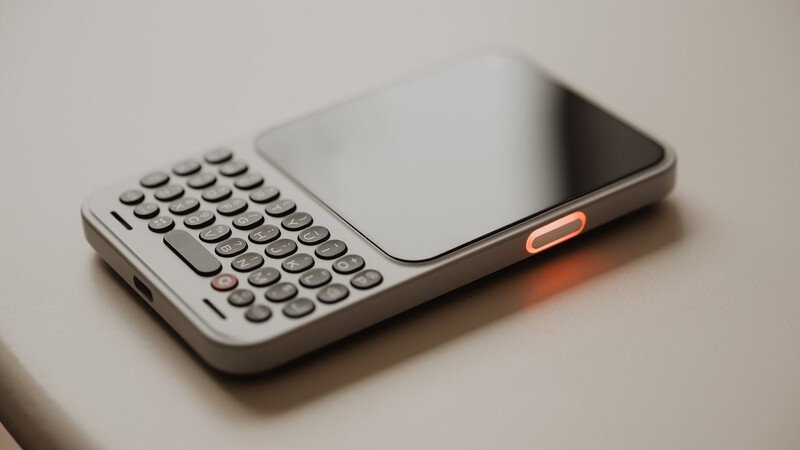
The keyboard sits below a 4.03-inch OLED touchscreen with 1200 × 1080 resolution—basically small enough to fit in a jacket pocket, but big enough to actually read conversations without squinting.
Even the small details matter. The space bar has a fingerprint sensor built in. The keyboard keys are touch-sensitive, so you get haptic feedback (a little vibration) when you tap them. These aren’t accidents—they’re designed to make typing feel satisfying and real, not like you’re poking glass.
It’s designed in Switzerland and assembled in Germany, so Clicks is betting that people will care about build quality the same way they do with mechanical keyboards.
The “Signal Light” (The Feature Nobody Knew They Needed)
Here’s the weirdest feature that actually makes sense: a colorful LED light built into the side button.
This light can be configured to show different colors for different apps—blue for WhatsApp, red for email, yellow for Slack, whatever you want. The idea is that you see a notification by the color alone, without unlocking your phone or checking the screen.
In normal-person terms: You glance at your phone and know instantly whether it’s a message from your boss, your friend, or a newsletter without doing anything. That’s it. That’s the feature.
It sounds gimmicky until you realize how much time we waste unlocking phones just to see what lit up. With Clicks Communicator, the light tells you the priority before you even touch it.
The Message Hub (Where Everything Comes Together)
Clicks built custom software called the “Message Hub” (using Niagara Launcher under the hood) that does something revolutionary: it shows you all your messages from all apps on your home screen.
So instead of opening WhatsApp, then Telegram, then Signal, then email, then Slack—your Communicator shows every message in one triage list.
You know that feeling when you realize you forgot to reply to someone three days ago because their message got buried? Message Hub kills that problem.
It’s like an email inbox, but for every single way someone can message you. You see everything at once, prioritize what matters, and move on.
The Prompt Key (Your Voice Button)
On the side of the phone is a programmable button called the “Prompt Key.” Hold it down, and it starts recording your voice. Let go, and it transcribes what you said into text and can send it directly as a message.
This is huge if you’re the type of person who can dictate messages faster than you can type (and most people can).
Clicks hints that this button will eventually support AI shortcuts too—like “send me a daily digest” or “call me a taxi”—but right now it’s built for voice recording and transcription.
Real Talk: Who Should Buy This?
Clicks Communicator isn’t for everyone, and Clicks is honest about that.
Buy it if you:
- Work in sales, support, community management, or any job where you live in messages
- Want a “focus phone” to separate work communication from personal scrolling
- Actually liked physical keyboards on old BlackBerrys and miss them
- Spend too much time on your main phone and need a way to break the habit
- Are chronically bad at replying to messages and want fewer distractions
Skip it if you:
- Need a camera phone for serious photography (it’s 50MP rear, 24MP front—decent but not flagship-level)
- Play mobile games or watch a lot of videos
- Want the latest social media apps optimized for scrolling
- Use your phone as your only device (it can be primary, but it’s designed as secondary)
The Hardware You Get
Here’s what’s actually inside:
- Display: 4.03-inch AMOLED with 1080 x 1200 resolution (small, sharp, clear)
- Processor: MediaTek 4-nanometer 5G chipset (modern, efficient, not a gaming machine)
- Battery: 4,000 mAh with silicon-carbon tech (designed for all-day messaging, not heavy use)
- Storage: 256GB with microSD card expansion (up to 2TB)
- 5G Support: Works on global 5G bands across most countries
- SIM: Physical nano-SIM or eSIM (your choice)
- Audio: 3.5mm headphone jack (yes, really)
- Special: Qi2 magnets for wireless charging, interchangeable back panels, physical mute switch
Battery life hasn’t been officially announced yet, but Clicks says they’ve made it a “core design priority” and paired the 4,000 mAh with an efficient display and processor.
Software-wise, it runs Android 16 with 2 years of updates and 5 years of security updates—which is solid commitment.
Pricing & Availability
Clicks opened reservations in early January 2026 with three pricing options:
- $199 deposit (applied toward final purchase)
- $399 early bird price (full payment upfront, includes two free back covers)
- $499 regular price (when it launches later in 2026)
Shipping is expected “later in 2026,” with early reservation holders getting priority fulfillment.
Clicks currently ships to the US, Canada, Mexico, most of Europe, Australia, New Zealand, and parts of the Middle East.
The Real Question: Is This a Gimmick or Actually Useful?
Look, there’s a reason people are talking about Clicks Communicator in January 2026. It’s not because of the hardware specs (plenty of phones have good specs). It’s because Clicks is solving a real problem that everyone pretends isn’t a problem.
We all know modern phones are designed to keep us scrolling. We all know we check messages and end up doom-scrolling for an hour. We all pretend it’s fine.
Clicks Communicator is basically a phone that says: “We’re not going to let that happen.”
Is it perfect? No. The camera is mediocre. Battery life is unknown. It’s a “second phone,” which means you’re carrying two devices. And if you’re someone who uses your phone for everything—work, photos, navigation, banking, social media—this isn’t for you.
But if you’re the person who wants to change how you use your phone? If you’re tired of being distracted? If you text way more than you post on social media? Then Clicks Communicator is worth serious consideration.
It’s not a retro phone cosplaying as modern. It’s a future phone designed for people who are actually tired of the present.
Final Thoughts
Clicks Communicator launches later in 2026. If you’ve been curious about it, the $199 reservation deposit is low-risk—you can cancel anytime and get a full refund.
The keyboard will absolutely make you smile the first time you use it. The signal light will genuinely make communication faster. And the message hub will probably change how you triage what needs your attention.
Whether that’s worth $499 is totally up to you. But in a world of distraction-machines disguised as phones, it’s nice to know someone’s building the opposite.